HR analytics software for UAE and Egypt teams
See headcount, turnover and tenure for the whole company or one legal entity, find out why people leave and who is behind each breakdown. Ready-made reports export to CSV or Excel, and NOSI Form 1 and Form 6 come pre-filled for your Egyptian entity.
Headcount at month end
72
Before and after
Where HR numbers usually break
Before
Every month someone rebuilds the headcount and turnover spreadsheet by hand, and the numbers never quite match the ones from last month.
With Mira HR
Mira HR counts headcount, annualised turnover, average tenure and profile completeness from employment records every time you open Analytics, with the change against the previous period of the same length.
Before
Management asks why people are leaving. The answer is a guess, because exit reasons sit in emails and nobody split resignations from dismissals.
With Mira HR
Turnover splits into voluntary and involuntary, with exit reasons, the departments people left from and their contract type on the last day. Click any bar to see who is behind it.
Before
A colleague asks for a list of everyone hired this quarter, with their legal entity and department. HR filters an export for an hour, and the file goes out with the wrong columns.
With Mira HR
Open the Hires and exits report, pick the period and legal entity, choose the columns and export to CSV or Excel. The export is logged in the history, so you can download it again later.
Features
Analytics and reports in one place
Headcount, turnover, tenure and profile completeness
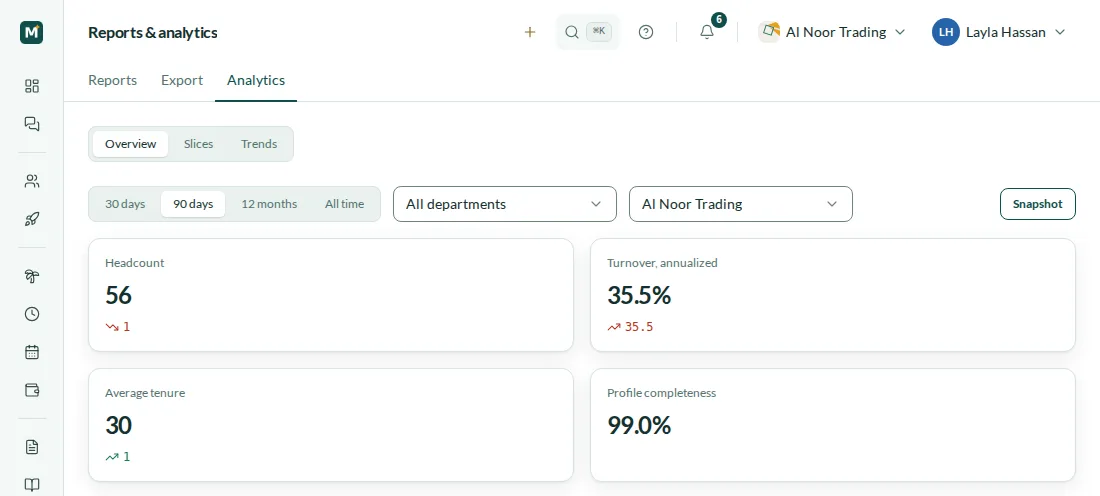
The overview opens with four numbers: headcount, turnover annualised, average tenure in months and profile completeness. Each one, except completeness, shows its change against the previous period of the same length — 30 days, 90 days or 12 months; All time has nothing to compare with. Below the numbers are headcount by department, people who joined and left by month, and breakdowns by citizenship, gender and age group. Citizenship splits people into local citizens and expatriates against the country of the company. Profile completeness counts the five fields the charts depend on — gender, date of birth, citizenship, department and an active contract — so you can see why a chart has a “no data” segment and what to fill in.
- Headcount, annualised turnover, average tenure, profile completeness
- Change against the previous period
- Breakdowns by department, citizenship, gender and age
- 30 days, 90 days, 12 months or All time
Turnover: voluntary, involuntary and why
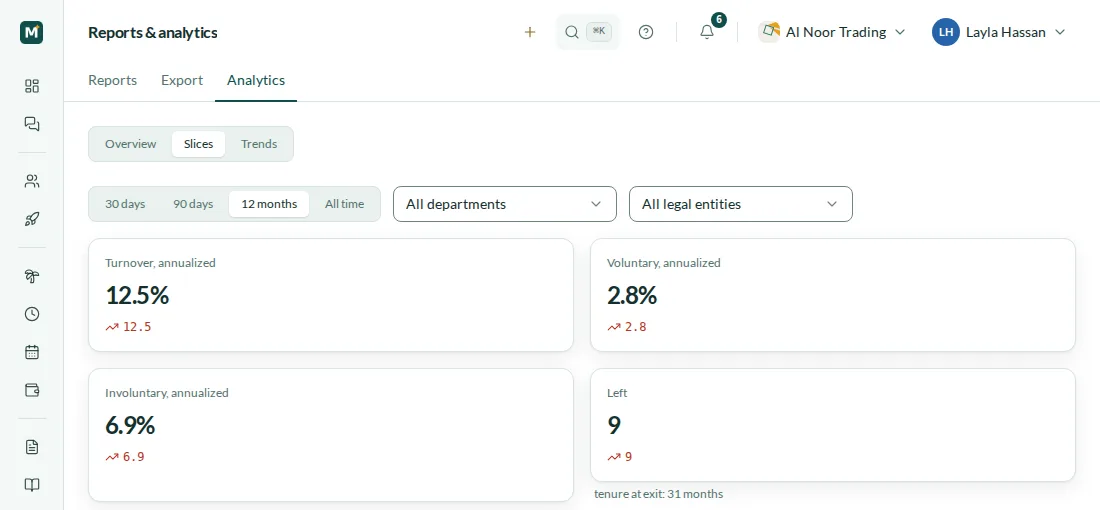
Slices shows turnover annualised, then voluntary and involuntary turnover separately, the number of leavers and their average tenure at exit. Every exit reason belongs to one group: resignation and exit due to employer breach are voluntary; lawful dismissal, dismissal for misconduct, arbitrary dismissal and probation termination are involuntary; contract expiry and death in service are counted as other, so they don’t blur either side. Beside turnover by month you see the reasons for leaving, leavers by department and the contract type on the last day — probation, fixed-term or indefinite.
- Voluntary and involuntary turnover, annualised
- Reasons for leaving in three groups
- Leavers by department and by contract type on the last day
- Average tenure at exit
Trends by month
Trends shows three charts, one under another: headcount at month end, people who joined and left in each month, and turnover by month. Every point is a full calendar month, so a month that has just started doesn’t pull the line down, and a month with no movement stays on the chart as zero instead of disappearing. Choose 12 months to see the year, or All time to go back to your earliest hire. Under each chart, Mira HR prints the period and the department and legal entity it covers, so a chart that is shared or printed still says what it shows.
- Headcount at month end
- Joined and left by month
- Turnover by month
- Every trend chart labelled with its period and filters
Trends by month
From a chart to the people behind it, with privacy built in
Click a department, a citizenship group, a gender, an age group, an exit reason or a contract type, and Mira HR opens the list of people in that selection: name, position, department, hire date and, for leavers, the last day, reason and contract type. Every chart and list can be narrowed to one department or one legal entity, so your UAE and Egyptian entities can be read apart. When fewer than five people are in a selection, Mira HR hides the breakdowns by gender, age, citizenship, exit reason and contract type and doesn’t show the list of names — only the count — so no one can be identified from a small group. Analytics is a section for owners and HR, not for every employee.
- Click a breakdown to see who is in it
- Filter by department and legal entity
- Groups under five people are hidden
- The period and filters live in the link you share
A report catalogue with your own columns and views
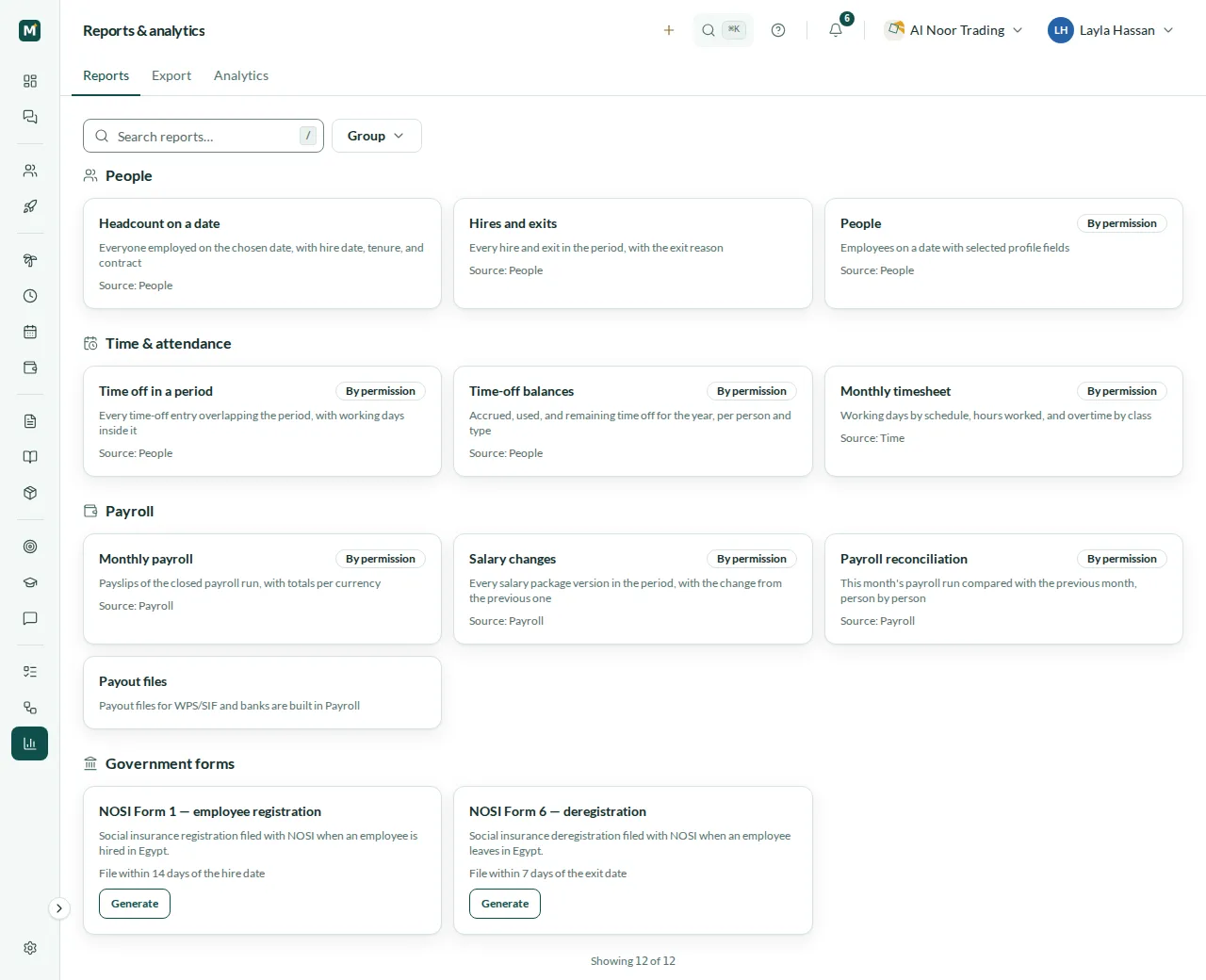
Reports gathers ready-made reports in groups. People: headcount on a date, hires and exits, and a People report with the profile fields you pick, including the UAE and Egypt fields. Time & attendance: time off in a period, time-off balances and the monthly timesheet. Payroll: monthly payroll with totals per currency, salary changes and payroll reconciliation against the previous month. The timesheet report needs Time & Attendance and the payroll reports need Payroll — without those modules the catalogue marks them as not included in your plan. Each report filters by legal entity and period, and most by department too, and you choose its columns and sort by any of them. Save the filters and columns as your own named view and pick which view opens first. Export to CSV or Excel: every export is kept in the export history as CSV for 90 days, with who exported it, the filters, the row count and a link to open the report again with the same filters.
- People, time & attendance and payroll reports
- Column picker, sorting and personal saved views
- Export to CSV or Excel
- Export history: download again for 90 days
NOSI Form 1 and Form 6, pre-filled
For employees of your Egyptian legal entity, the catalogue offers two social insurance forms: NOSI Form 1 to register a new hire, filed within 14 days of the hire date, and NOSI Form 6 to deregister an employee who leaves, filed within 7 days of the exit date. Choose the employee, and Mira HR fills in what it already knows: the establishment details from your company profile, the National ID and insurance number from the employee’s documents, the job and dates from their employment, and the wages from their salary package when Payroll is on and you have access to it. Fields the system doesn’t hold, such as the exit reason code, you enter yourself; anything you change is marked as edited. Generate the form and you get a PDF, and the issued form is kept in the export history for HR who can see forms. Filing with NOSI is still yours to do.
- Form 1 on hire, Form 6 on exit
- Pre-filled from profiles, documents and salary packages
- You review and complete every field before the PDF
- Issued forms kept in the export history
Steps
How it works
Fill in employee profiles
Gender, date of birth, citizenship, department and contract — profile completeness shows what is still missing.
Read the overview
Pick a period and, if you like, a department or legal entity: headcount, turnover and tenure update for that selection.
Drill into turnover
See voluntary and involuntary turnover, the reasons and departments behind it, and click through to the people.
Export what you need
Open a report, choose the columns, export to CSV or Excel, or generate a NOSI form for an Egyptian employee.
Local rules
Numbers for UAE and Egypt entities
United Arab Emirates
- Analytics and reports filtered by your UAE legal entity
- Local citizens and expatriates, split by citizenship
- Monthly payroll report with totals per currency, with Payroll
- WPS payout files one click away from the catalogue, built in Payroll
Egypt
- NOSI Form 1 on hire, to file within 14 days
- NOSI Form 6 on exit, to file within 7 days
- Forms pre-filled from the profile, National ID, insurance number and salary package
- Every issued form kept in the export history
Related
Works with
Core HR
Employee records, org chart, legal entities, statutory time off, team calendar, assets, chat, tasks and a knowledge base.
Performance management
Goals and OKRs, review cycles with self-assessment, 360° feedback, 9-box calibration, KPI bonuses, development plans and engagement surveys.
Documents & expiry tracking
A folder tree with a personal folder for every employee, UAE and Egypt document types, expiry reminders and one queue for what is expired, expiring or missing.
Payroll
Monthly runs per legal entity, WPS-ready SIF files, Article 51 gratuity, Egyptian income tax and social insurance.
FAQ
Analytics questions
How is annualised turnover calculated?
Mira HR divides the number of leavers in the period by the average headcount over the period and scales the result to a year, so 30 days, 90 days and 12 months can be compared. If there was no one to leave, turnover is not shown rather than shown as zero.
Why is a chart hidden?
When fewer than five people are in a selection, the breakdowns by gender, age, citizenship, exit reason and contract type are hidden, and the people list shows only the count. In a small group, even one segment could point to a person.
Can we see the UAE and Egyptian entities separately?
Yes. Every analytics screen and every report filters by legal entity, and analytics and most reports by department too. Someone transferred between entities shows as leaving one and joining the other.
Which export formats are there?
CSV and Excel. Every export is saved in the export history as CSV with the same data, and you can download it again for 90 days. A very large export is still delivered to you, but isn’t kept in the history.
Does Mira HR file NOSI forms for us?
No. Mira HR pre-fills Form 1 and Form 6 from the data you already keep and produces the PDF; you check every field, complete what the system doesn’t hold and file the form with NOSI yourself.
Is Analytics a separate module?
No. Analytics and reports are included in Core HR. Reports built on payroll or timesheets need Payroll or Time & Attendance in your plan; without them, the catalogue shows those reports as not included.
Does it work in Arabic?
Yes. Analytics and reports work in Arabic, right to left, as well as in English.
From the blog
 Insights
Keeping talent in Cairo: it's not about a better desk
You can't out-pay a dollar remote job in Egypt. What keeps skilled people is a visible path, benefits that land, and being heard. Here's how to run it.
 Payroll
Egypt social insurance in 2026: the caps moved
From 1 January 2026 the insurable wage is EGP 2,700–16,700, split 11% and 18.75%. The worked math, why it changes every January, and how to avoid fines.
 Insights
What paper-based HR really costs in the UAE & Egypt (2026)
Manual payroll and paper HR cost UAE companies AED 350K–500K a year and Egypt teams EGP 144K–288K in rework alone — before fines. Here's the math.
Set up HR for your company in 10 minutes
No implementation fees. Cancel anytime.