HR approval workflow software for UAE and Egypt teams
Time off, expense claims, punch corrections, leave encashment and the request types you create yourself all go through one approval engine. Decide who approves each kind of request in up to three levels, give every level a deadline in working days, and see where requests wait longer than they should.
OSBusiness trip to Abu DhabiOmar S.
Awaiting approvalApproved
- 1Level 1 · Direct managerWaitingApproved
- 2Level 2 · HRWaitingApproved
- 3Level 3 · OwnerWaitingApproved
Before and after
Where approvals usually get stuck
Before
A leave request arrives on WhatsApp, a taxi receipt by email and a request for an NOC on a printed form. Each one is tracked differently, if it is tracked at all.
With Mira HR
Every request goes through the same engine: time off, expense claims, punch corrections, leave encashment and the request types you add yourself, such as an NOC request. Each one gets a number and follows its route.
Before
Nobody knows whose desk a request is on. The employee asks HR, HR asks the manager, and the manager is sure it was approved last week.
With Mira HR
The employee sees each request in My requests with its route: which step it is on and whose decision it is waiting for. Approvers have one Awaiting approval queue.
Before
Approvals take as long as they take. There is no agreed deadline, and no way to see which step slows everyone down.
With Mira HR
Each level of a chain gets a deadline in working days. Late requests are marked overdue in the queue, and the turnaround report for each route shows which level misses its deadline.
Features
How approvals work in Mira HR
One approval engine for every kind of request
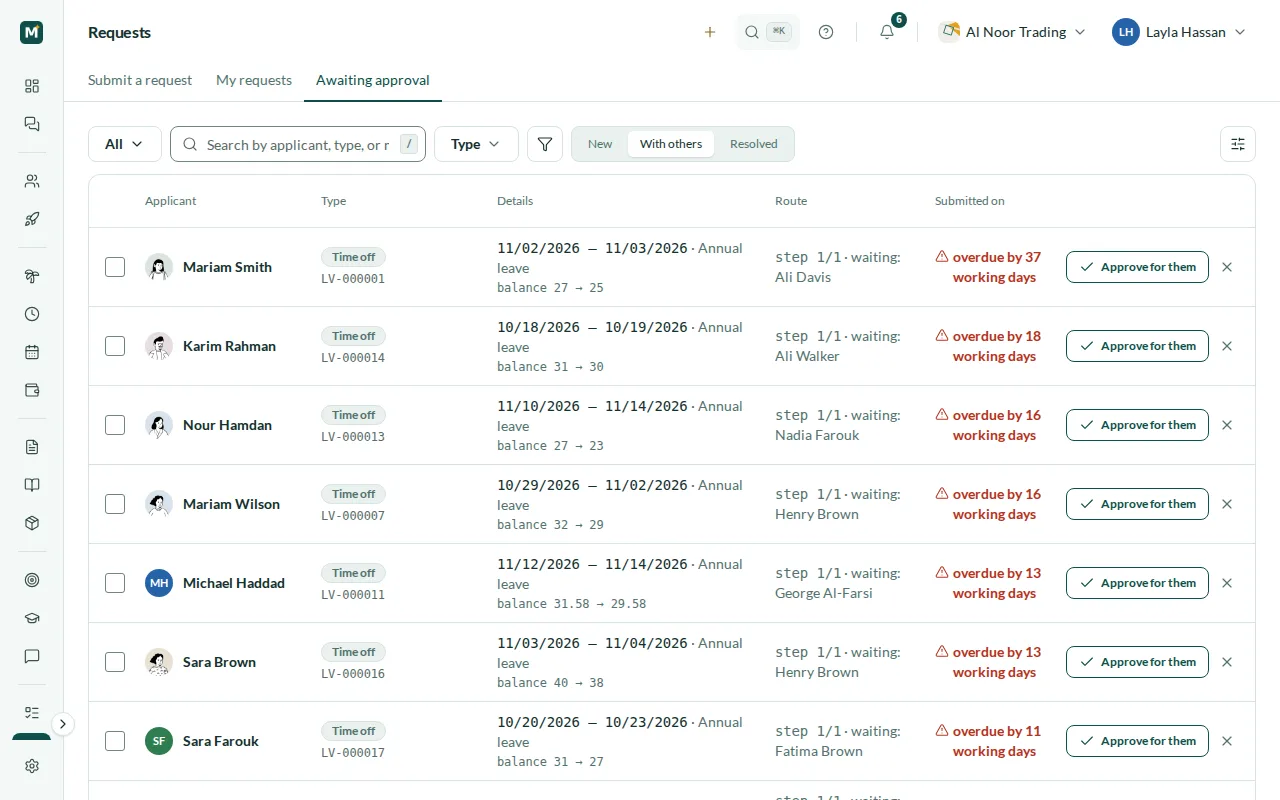
Time off, expense claims, punch corrections, leave encashment and your own request types all go through the same approval engine, so approvers learn one way of working. Every request gets a serial number built from the prefix of its kind — LV-000001 for time off, EXP- for expense claims, ENC- for encashment — and the queue can be searched by number, applicant or type. Approvers decide from Awaiting approval, which shows the details of each request: the dates and the balance after the leave, or the amount of an expense claim and whether a receipt is attached. A decline needs a reason, and the applicant sees it. Expense claims and leave encashment come with the Payroll module, punch corrections with Time & Attendance.
- Time off, expenses, punch corrections, encashment and custom requests
- A serial number on every request
- One Awaiting approval queue for approvers
- A reason is required to decline
Approval chains of up to three levels
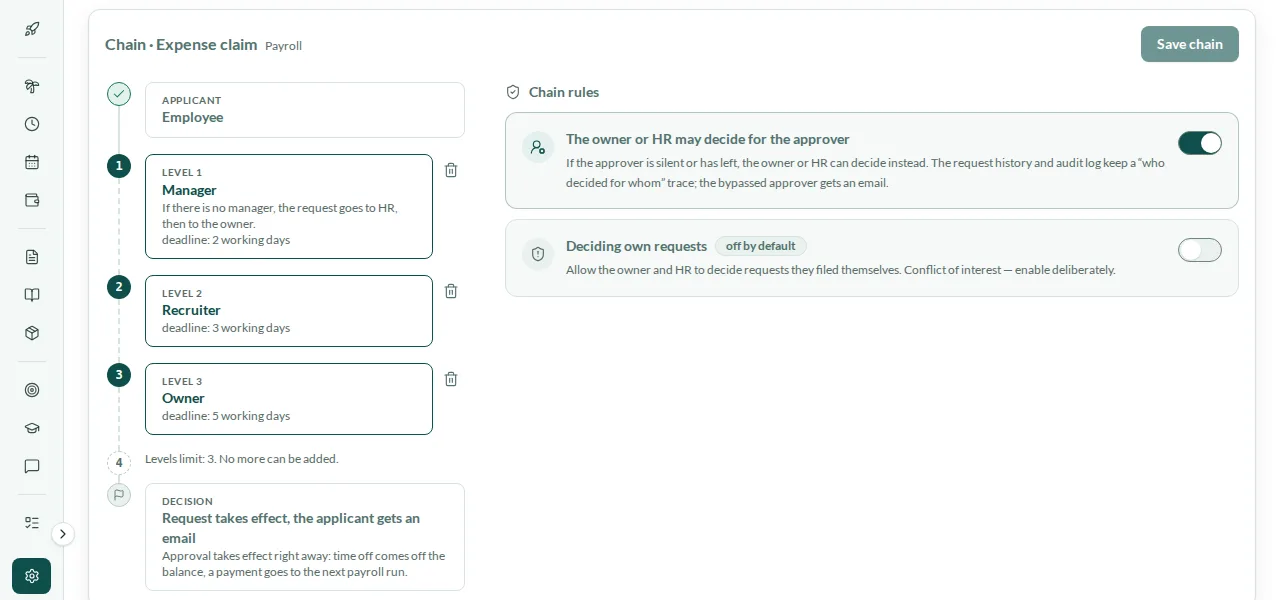
In Settings → Approvals, HR, or anyone you give access to that section, chooses who approves each kind of request. A chain has up to three levels, and each level goes to the applicant’s direct manager, to the people holding a role you choose, or to the company owners. Once a level approves, the request moves on to the next one. If the route finds no one to approve — the applicant has no manager, for example — the request goes to HR, then to the owner. A leave type or a custom request type can have its own route: it starts as a copy of the shared route for its kind, and every other type keeps following the shared one. Where the route allows it — the default for every kind except those addressed to the owners — the owner or HR can decide on behalf of the approver; the bypassed approver gets an email, and the request history shows who decided for whom. Switch approval off for a route and its requests are approved straight away, with no approvers. Route changes apply to new requests; requests already in progress finish on the route they started with.
- Up to three levels per chain
- Direct manager, a role or the company owners at each level
- Own routes for a leave type or a custom request type
- Changes apply to new requests only
Your own request types, with their own numbers
Beyond the built-in kinds, HR creates the request types the company needs — an NOC request, a business trip, a parking permit — in the Request types section of Settings → Approvals. For each type you decide whether the employee has to enter an amount, write a note or attach a file, and the request cannot be sent without them. Each type has its own number prefix of up to six Latin letters or digits, so its requests read NOC-000014 or TRP-000003. A new type starts as a draft and appears on the employees’ request portal once you publish it. Unpublish it later and it disappears from the portal, while the requests already submitted carry on through approval as usual.
- Amount, note and file — each one can be required
- A number prefix per type, such as NOC-000014
- A draft until you publish it
- Unpublish without losing submitted requests
Request types
- NOC letterNOCNote requiredFile required
- Business tripTRPAmount requiredNote required
- Parking permitPRKFile required
Request numberNOC-000014
My requests: every request with its route
Employees find everything they have asked for in Requests → My requests: time off, expense claims and custom requests, each with its number and status. Opening a request shows its timeline: when it was submitted, which step of the route it is on, whose decision it is waiting for and for how many days, and who made the decision and when. While a request is still waiting, the employee can withdraw it. Approvers work from Awaiting approval, and HR and the owner also see the requests waiting with other approvers, so nothing sits unnoticed in someone’s queue.
- Number, status and route of every request
- A timeline from submission to decision
- Withdraw a request while it awaits approval
- HR and the owner see requests waiting with others
My requests
- Time offAnnual leave · 12–16 JanuaryApproved
- Expense claimTaxi to a client meetingAwaiting approval
- RequestBusiness trip to Abu DhabiAwaiting approval
Annual leave balance16 days
Deadlines in working days and a turnaround report
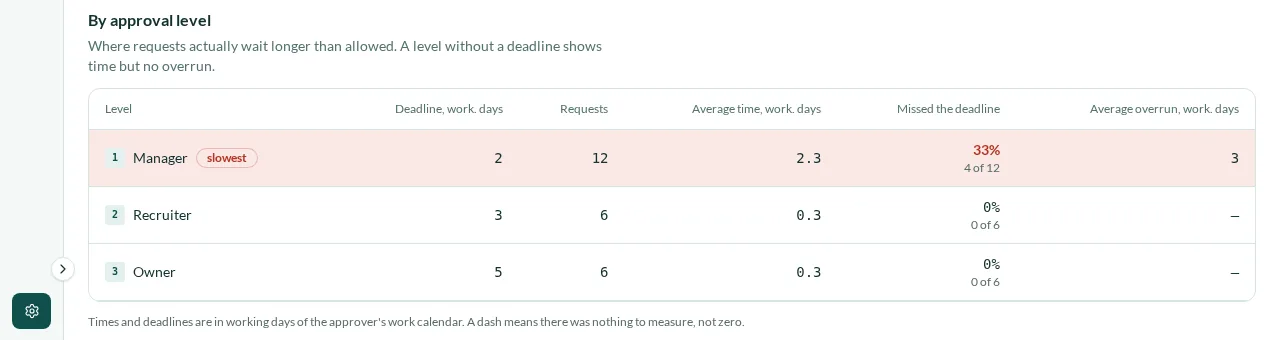
Each level of a chain can have a deadline from 1 to 90 working days, or none at all. Working days are counted on the approver’s work calendar: weekends and the public holidays on that calendar don’t count, whether the approver works Monday to Friday in Dubai or Sunday to Thursday in Cairo. When a level runs past its deadline, the request is marked overdue in the queue, with the number of working days it is late. The turnaround report for each route covers a day, a week, a month, a year or a range you choose: how many requests were submitted, approved, declined and overdue, and the average time they took. For each level it shows the deadline, the average time, the share of requests that missed the deadline and the average overrun, with the slowest level marked.
- 1 to 90 working days per level, or no deadline
- Counted on the approver’s work calendar
- Overdue requests marked with the days late
- A turnaround report per route and per level
Revoke a decision, follow every change
Mistakes happen. The approver who made a decision, or the company owner, can revoke it — an approval or a decline — with a reason that stays in the request history. The consequences of the earlier decision are rolled back and the request returns to the approval queue to be decided again. Some decisions can no longer be revoked: once the money from an approved expense claim is in a payroll run, for example, or when the request was approved automatically. The queue and My requests update by themselves when a request is submitted or decided, without reloading the page. Approvers hear about new requests and applicants about decisions in Mira HR and by email, and in the Android app, in early access, as a push notification.
- Revoke an approval or a decline, with a reason
- Consequences rolled back, the request decided again
- Queues update without reloading the page
- Email and Android push notifications (early access)
9:41
Android app · early access
Mira HR
Your request was approved
Your request was approved: Annual leave 12–16 January
Unlock with biometrics
Steps
How it works
Choose who approves
For each kind of request, set the chain: up to three levels, each with the manager, a role or the owners.
Set deadlines
Give each level a deadline in working days, or leave it without one.
Add your request types
Create the custom types you need, choose their required fields and number prefix, and publish them.
Decide and review
Approvers decide from one queue, and the turnaround report shows where requests wait too long.
Related
Works with
Time & Attendance
Web clock-in and clock-out, work schedules, weekly timesheets with approval, correction requests and overtime by country rules.
Payroll
Monthly runs per legal entity, WPS-ready SIF files, Article 51 gratuity, Egyptian income tax and social insurance.
Employee self-service
Every employee’s own corner of Mira HR: profile, documents, assets, time off with balances, requests and, with Payroll, payslips and expense claims. On Android in early access.
Core HR
Employee records, org chart, legal entities, statutory time off, team calendar, assets, chat, tasks and a knowledge base.
FAQ
Approval questions
Which requests go through approvals?
Time off, expense claims, punch corrections, leave encashment and the custom request types you create. Time off and custom requests are part of Core HR; expense claims and leave encashment come with the Payroll module, punch corrections with Time & Attendance.
How many approval levels can a chain have?
Up to three. Each level goes to the applicant’s direct manager, to the holders of a role you choose, or to the company owners. A leave type or a custom request type can have its own chain.
What if a route finds no one to approve?
If the applicant has no manager, or nobody else holds the role on that level, the request goes to HR, then to the owner.
How are deadlines counted?
In working days on the approver’s work calendar, so weekends and the public holidays on that calendar are skipped. A level can have a deadline from 1 to 90 working days, or none.
Can a decision be undone?
Yes. The approver who made it, or the company owner, can revoke it with a reason, and the request goes back to the queue to be decided again. A decision can no longer be revoked once its money is in a payroll run, and automatic approvals cannot be revoked.
What does the employee see?
Every request in My requests with its number, status and route: which step it is on and whose decision it is waiting for. They are notified of the decision in Mira HR and by email, and can withdraw a request while it is still awaiting approval.
Is there a report on approval times?
Yes, a turnaround report for each route: submitted, approved, declined and overdue requests for the period you choose, and for each level its deadline, average time in working days and the share of requests that missed it.
Does it work in Arabic?
Yes. Requests, approvals and their settings work in Arabic, right to left, as well as in English.
From the blog
 Guides
Is Egypt ready for paperless HR? Yes, with two catches
Egypt's 2025 labor law allows digital employee files, payroll, and contracts. What still needs paper, and why a Drive folder isn't going paperless.
 Insights
What paper-based HR really costs in the UAE & Egypt (2026)
Manual payroll and paper HR cost UAE companies AED 350K–500K a year and Egypt teams EGP 144K–288K in rework alone — before fines. Here's the math.
 Compliance
Running HR and payroll across the UAE and Egypt
WPS vs Egypt's bank-transfer law, gratuity vs NOSI severance, two currencies, two calendars — what changes when one company runs HR in both countries.
Set up HR for your company in 10 minutes
No implementation fees. Cancel anytime.