Performance management software for the UAE and Egypt
Set goals that cascade from the company to every employee, run review cycles with self-assessment and 360° feedback, calibrate results on a 9-box grid and turn KPIs into a bonus request for payroll. Development plans and engagement surveys sit in the same module.
Calibration · Q3 review
Calibration in progressMove logged
- AK
- OS
- AK
- LH
Rows: potential · Columns: performance
Before and after
Where performance reviews usually go wrong
Before
Company goals live in a slide deck, team goals in spreadsheets, and nobody can say how the work of one person adds up to the plan for the year.
With Mira HR
Goals cascade from the company to departments and employees, and the progress of approved child goals rolls up to the goal above them.
Before
The annual review is a document sent by email. HR chases forms for weeks, and every manager scores against a different idea of what good looks like.
With Mira HR
A review cycle uses one form with weighted criteria and a level scale, shows each participant’s status and sends reminders before the due date.
Before
Bonuses are worked out in a spreadsheet from KPI numbers collected by message, then typed into payroll by hand.
With Mira HR
KPI metrics hold plan, fact and bonus bands. The bonus for the period is summed up from them and goes through approvals as a bonus request to payroll.
Features
Goals, reviews and growth in one module
Goals and OKRs that cascade from the company to every employee
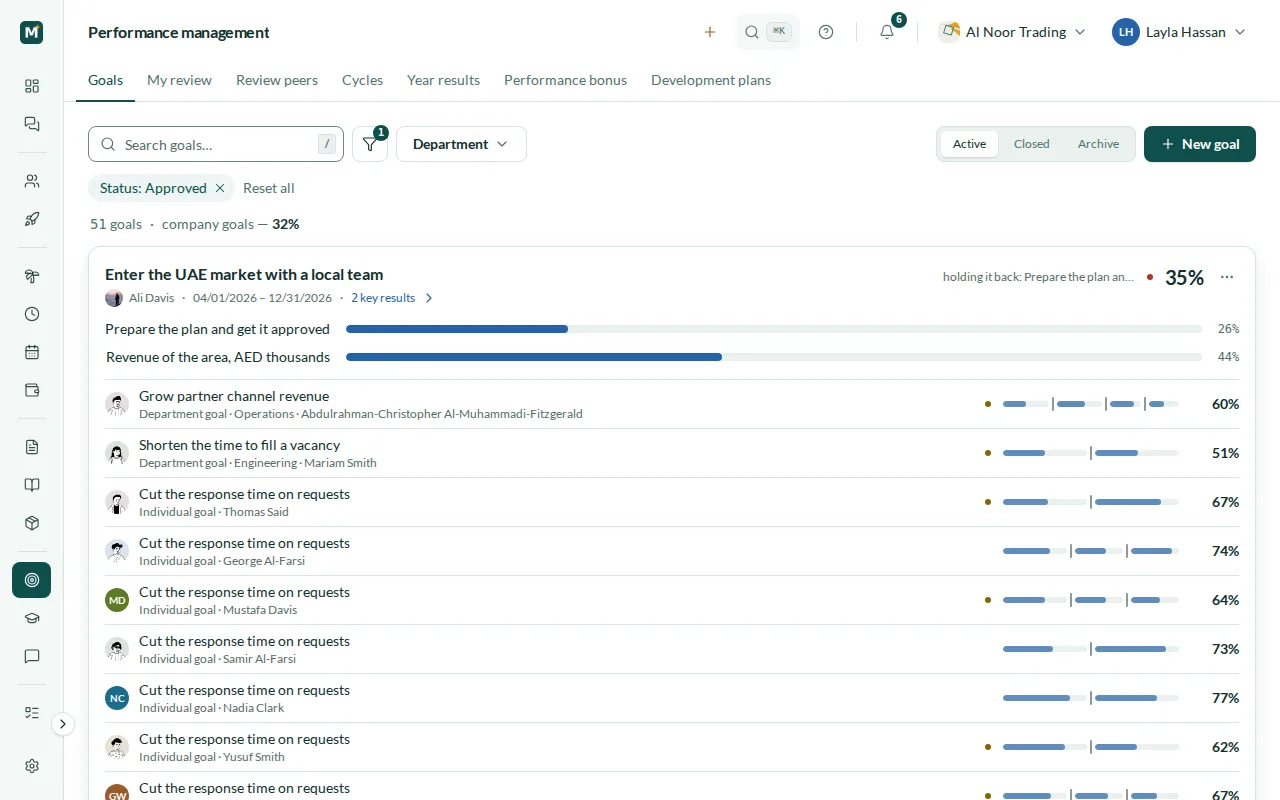
Set company goals, break them down into department goals and then into individual goals, three levels in one tree. Each goal has key results with weights: a task is tracked as a percentage, a range as the value achieved against the target. A goal without key results of its own takes its progress from its approved child goals, and the key result holding a goal back is named next to it. Department goals are run by the head of the department; individual goals are approved by the employee’s manager.
- Company, department and individual goals in one tree
- Weighted key results: tasks and target ranges
- Progress rolls up from approved child goals
- Individual goals approved by the manager
Review cycles with self-assessment and manager review
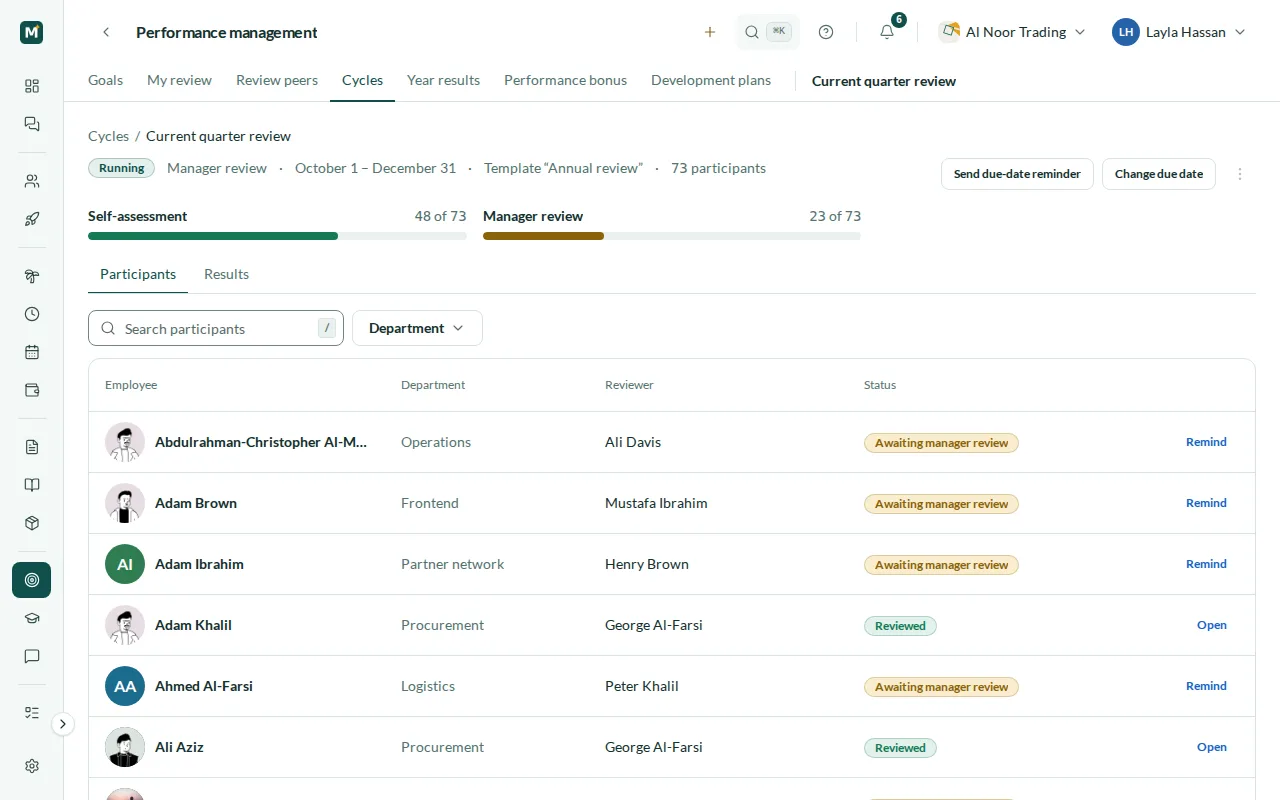
Build a review form once and reuse it. A template has weighted blocks for goals, competencies and general factors, the criteria inside them and a level scale. The goals block is filled from the participant’s approved goals, and competencies can come from the template or from the competencies of the participant’s position. A cycle sets the assessed period, the due date and the departments taking part, and can leave out people still on probation. Each participant fills in a self-assessment, and their manager reviews them. Employees see their manager’s scores once the cycle is closed.
- Templates with weighted blocks, criteria and a level scale
- Competency-based reviews from the position profile
- Self-assessment and manager review
- Due dates, progress per stage and reminders
360° feedback, feedback requests and 1:1 meetings
A 360° review is its own kind of cycle with a questionnaire of rating and open questions. Reviewer groups are the employee, their manager, their direct reports and peers: managers and reports come from the org structure, peers are assigned by HR. Each group gets a weight, and the self-assessment is shown but not counted in the result. Between cycles, people ask colleagues for feedback about themselves or about someone who reports to them, and managers run 1:1 meetings with an agenda and action items; in a recurring series, open action items move on to the next meeting.
- Reviewer groups: self, manager, direct reports and peers
- A weight for every reviewer group
- Feedback requests to up to ten colleagues
- 1:1 meetings with an agenda and action items
9-box calibration with a log of every move
When a cycle includes a calibration stage, its participants are placed on a 3×3 grid of performance and potential once the reviews are in. Performance comes from the calculated result; potential is the call of the calibration committee named on the cycle. Moving someone to another box needs a comment, and every move is written to the log, so you can see later who changed what and why. When the cycle closes, the calibrated result is published instead of the calculated one.
- 9-box grid of performance and potential
- Calibration committee named on the cycle
- A comment required for every move
- Move log and calibrated results on close
KPI metrics with formulas and a bonus request to payroll
Give each employee KPI metrics for a period with a plan, a weight, a planned bonus and bands that turn the level of achievement into a share of the bonus. The fact is entered by the person responsible for it or calculated by a formula that refers to other metrics, with arithmetic and IF, AND and OR. The bonus for the period is summed up from the metrics, and a missing fact is not counted as zero: the bonus cannot be submitted until every fact is in. Submitted bonuses go through approvals as a bonus request, and once approved they reach the Payroll module.
- Plan, fact, weight and bonus bands on every metric
- Facts entered by hand or calculated by a formula
- Bonus summed up from all metrics of the period
- Bonus request through approvals to payroll
Individual development plans by competency
A development plan is a set of items, and each item can be tied to a competency and an indicator from your company’s competency library. Managers build plans for the people who report to them, and HR for anyone in the company. The employee submits an item with a short report, and a reviewer named on the plan accepts it or returns it. When the last item is accepted, the plan is completed, and a plan can be copied for another employee.
- Plan items can be tied to competencies and indicators
- Plans built by managers and HR
- Submit, accept or return each item
- Plan completed when the last item is accepted
Pulse and eNPS surveys that protect anonymity
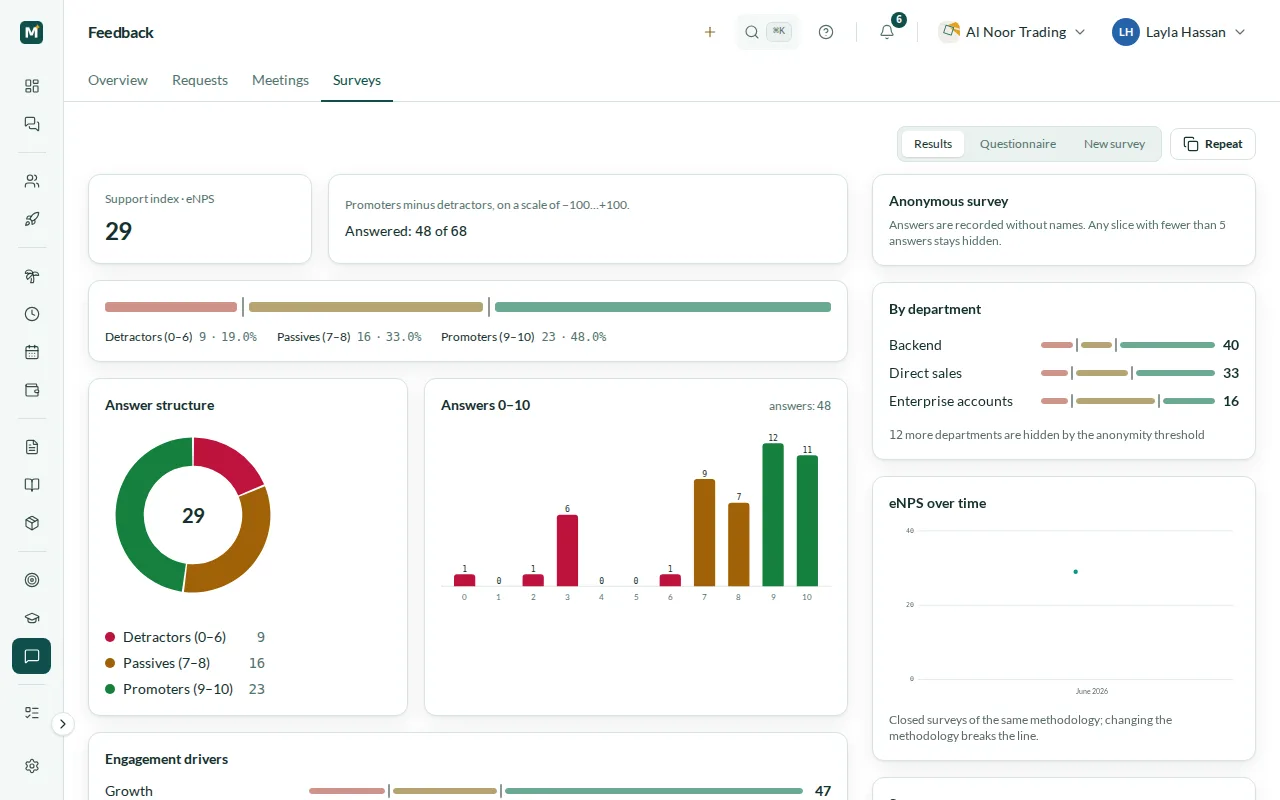
Run engagement surveys from a built-in library of methodologies: an eNPS question and statements grouped into engagement drivers such as growth, recognition and team. Send a survey to the whole company, to chosen departments or to a legal entity, now or from a later start date, and remind the people who have not answered yet. Answers are stored without names. Results appear only after the survey closes and only when at least five people have answered, and any department slice with fewer than five answers stays hidden.
- eNPS and engagement drivers from a built-in library
- Audience by department or legal entity
- Scheduled launch and reminders
- Anonymity threshold of five answers
Year results and a management overview
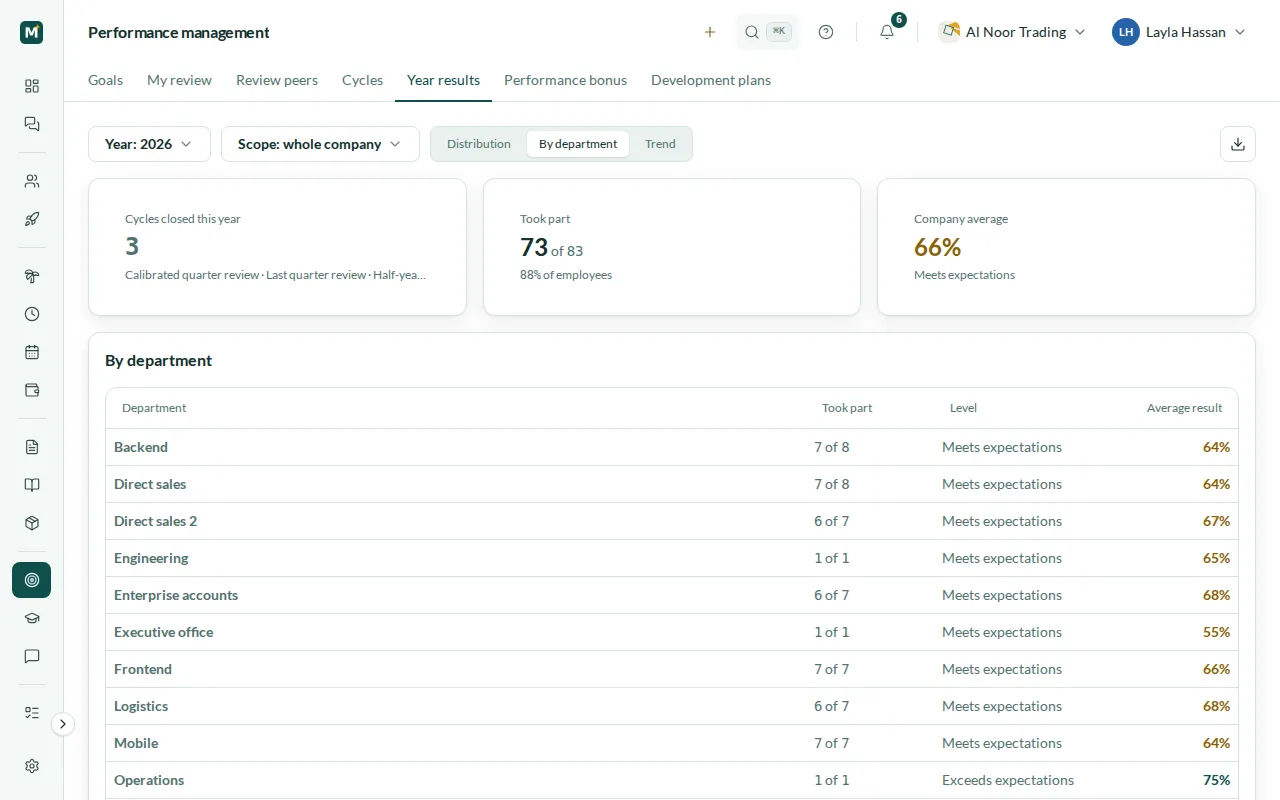
Year results bring the closed cycles of a year together for the people who can see review results. They show how many people took part, the company average and its level, the distribution by level, results by department and the trend by quarter, along with the share of goals closed on time. Narrow the view to one department or export it.
- Participation and company average for the year
- Distribution of people by level
- Results by department and by quarter
- Goals closed on time
Steps
How you get started
Set the goals
Add company goals with key results, let department heads break them down and approve the individual goals of your people.
Prepare the review form
Build a template with weighted blocks and a level scale, and link competencies to positions in the competency library.
Run the cycle
Choose the period, the due date and the departments. Self-assessments, manager reviews and 360° feedback come in with reminders along the way.
Calibrate and act
Calibrate on the 9-box grid, publish results, submit KPI bonuses for approval and turn gaps into development plans.
Local rules
Built for teams in the UAE and Egypt
United Arab Emirates
- Arabic and English interface, right to left in Arabic
- People on probation, up to six months in the UAE, can be left out of a cycle
- Engagement surveys can be sent to just your UAE legal entity
- KPI bonuses in AED reach payroll together with the Payroll module
Egypt
- Arabic and English interface, right to left in Arabic
- People on probation, up to three months in Egypt, can be left out of a cycle
- Engagement surveys can be sent to just your Egyptian legal entity
- KPI bonuses in EGP reach payroll together with the Payroll module
Related
Works with
Core HR
Employee records, org chart, legal entities, statutory time off, team calendar, assets, chat, tasks and a knowledge base.
Payroll
Monthly runs per legal entity, WPS-ready SIF files, Article 51 gratuity, Egyptian income tax and social insurance.
Learning (LMS)
Courses from sections and five material types, quizzes with a pass mark, assignments reviewed by a curator, due dates, reminders and completion reports.
HR analytics & reports
Headcount, annualised turnover and hiring trends, ready-made HR reports with CSV and Excel export, and NOSI Form 1 and Form 6 pre-filled for Egypt.
FAQ
Performance management questions
What is included in Performance management?
Goals and OKRs, review cycles with self-assessment and manager review, 360° feedback, 9-box calibration, KPI metrics with bonuses, individual development plans, feedback requests, 1:1 meetings and pulse and eNPS surveys. It is a module you add to Core HR.
When do employees see their manager’s scores?
Once the cycle is closed. Until then the employee sees their own self-assessment, but not the scores their manager gave them.
How anonymous are the surveys?
Answers are stored without names. Results appear only after the survey closes and only when at least five people have answered; any department slice with fewer than five answers is hidden.
Do we need the Payroll module for KPI bonuses?
To submit them, yes. Without Payroll, Mira HR still calculates bonuses from the KPI metrics, but a bonus request can only be submitted when the Payroll module is on, because that is where approved bonuses go.
Can a finished course close an item in a development plan?
Coming soon. Today the employee submits the item with a report and the reviewer accepts it. Closing an item automatically when a related course in Learning is completed is planned.
Is the kudos feed part of this module?
No. The kudos feed is included in Core HR, so everyone can thank colleagues even without Performance management.
How is Performance management priced?
It is a module priced per employee per month, on top of Core HR, and it is not part of the free plan for teams of up to 3 people. The pricing page has the details.
From the blog
 Insights
KPIs and 360 feedback in Egypt: start with the culture
In a high-power-distance culture, a copy-pasted 360 gets polite silence. How to run reviews, OKRs, and upward feedback in Egypt without breaking trust.
 Insights
Keeping talent in Cairo: it's not about a better desk
You can't out-pay a dollar remote job in Egypt. What keeps skilled people is a visible path, benefits that land, and being heard. Here's how to run it.
 Compliance
Running HR and payroll across the UAE and Egypt
WPS vs Egypt's bank-transfer law, gratuity vs NOSI severance, two currencies, two calendars — what changes when one company runs HR in both countries.
Set up HR for your company in 10 minutes
No implementation fees. Cancel anytime.