An employee self-service portal for UAE and Egypt teams
Give every employee one place for their own HR: their profile, documents and assets, leave balance and time-off requests, payslips and expense claims, and the status of everything they have asked for. Fewer emails to HR, fewer “how many days do I have left?” questions.
My requests
- Annual leave · 12–16 JanuaryAwaiting approval · step 1/2Awaiting approval · step 2/2Approved
- Sick leave · 1 dayApproved
- NOC letterAwaiting approval
Annual leave balance21 days16 days
Before and after
Where employee requests usually get stuck
Before
An employee wants a week off in December. They message HR to ask how many days they have left, then send a leave form by email, then wait without knowing who has it.
With Mira HR
They open Time off, see their balance for each leave type, choose the dates and send the request. It goes to the approvers HR has set up, and its status is always visible in My requests.
Before
Every month someone asks HR to resend last month’s payslip, and taxi receipts arrive as phone photos in a chat, with no record of what was approved.
With Mira HR
With the Payroll module, employees open their payslips by month and download them as PDF, and submit expense claims with the receipt attached, for approval through the same route as any other request.
Before
HR hands over a laptop and a SIM card, and six months later nobody can say who received what, or whether they ever confirmed it.
With Mira HR
Assets issued to an employee appear on their My assets page. They confirm receipt, or report that they don’t have the item, and items they have returned stay listed in their history.
Features
What every employee gets
“My data”: profile, documents and assets
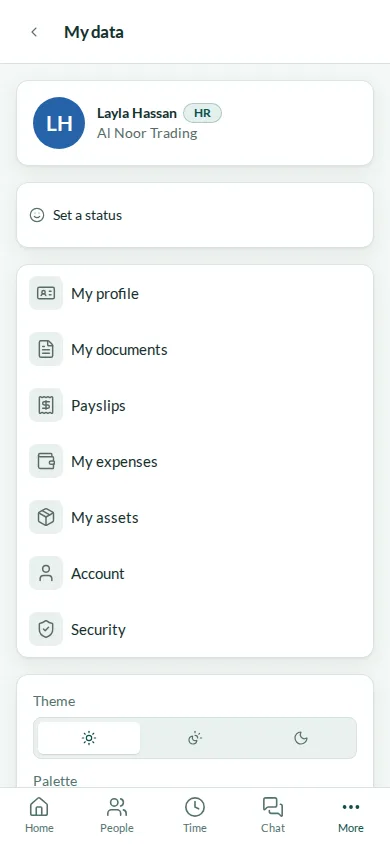
Each employee has My data, a set of pages about themselves in your company. My profile opens their own profile card, laid out the same way as the cards HR works with. My documents lists the documents they hold in Mira HR, and a file they upload goes straight into their personal folder, visible to them and to the people who have access to it. My assets shows what has been issued to them, with the date, and asks them to confirm receipt; if something on the list never reached them, they report it instead. Items they have handed back are kept in a separate list, so the history is there for both sides.
- Their own profile card
- My documents, with upload into their personal folder
- My assets, with confirmation of receipt
- Returned items kept in the history
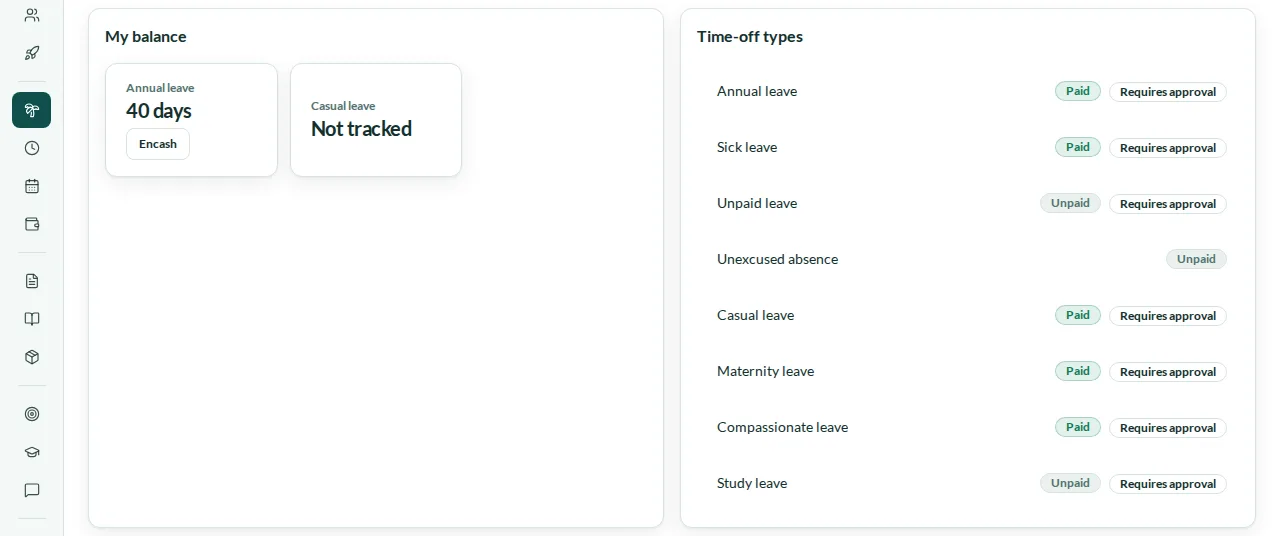
Time off with the balance in front of you
Employees request time off themselves. My balance shows how many days are left for each leave type the company tracks, and the list of leave types shows which are paid and which need approval. A request goes to the people on its approval route and appears in My requests, where the employee can follow it and withdraw it while it is still awaiting approval. Where a leave type needs a supporting document — a medical certificate for sick leave, for example — the request asks for the file, and it cannot be sent without one. Which types need a document is set by HR, per leave type.
- My balance for each tracked leave type
- Paid and approval rules visible for every type
- Withdraw a request while it awaits approval
- Supporting documents where the leave type requires one
Payslips and expense claims, with the Payroll module
With the Payroll module, every employee gets their payslips in Mira HR. A payslip appears as soon as the payroll run is approved or paid; the employee picks the month, sees the breakdown and downloads it as PDF. My expenses lets them claim an expense with the receipt attached and send it for approval, then follow each claim as a card with its status. Both pages are part of the Payroll module: without it, the rest of self-service works as described here.
- Payslips by month, as soon as the run is approved or paid
- Download a payslip as PDF
- Expense claims with the receipt attached
- Requires the Payroll module
My payslips
Payroll module- September 2026
- August 2026
- July 2026
Basic salary12,000
Housing allowance4,000
Net payAED 16,000
Download PDFMy requests and my approvals
Requests is where an employee sends and follows everything that needs a decision. My requests lists what they have sent — time off, expense claims and the request types your company sets up — with the status of each, and the approval route shows whose decision it is waiting for. When a decision is made, they get a notification in Mira HR and an email. People who approve requests — a direct manager, holders of a role you choose, or the company owners, depending on the route — have an Awaiting approval queue of everything waiting for their decision, and are notified in Mira HR and by email when a new request reaches them.
- Every request in one list, with its status
- The approval route of each request
- A queue for the requests waiting for your decision
- Notifications in Mira HR and by email
My requests
- Time offAnnual leave · 12–16 JanuaryApproved
- Expense claimTaxi to a client meetingAwaiting approval
- RequestBusiness trip to Abu DhabiAwaiting approval
Annual leave balance16 days
In English, Arabic and Russian
Mira HR works in English, Arabic and Russian, and each person chooses their own language in their account settings. In Arabic the whole interface runs right to left, so an Arabic-speaking employee and an English-speaking manager use the same pages, each in their own language.
- English, Arabic and Russian
- Right to left in Arabic
- Each person chooses their own language
An Android app, in early access
The Mira HR Android app is in early access: we share it directly with the teams taking part. It brings the same self-service to the phone, with push notifications — tap one and the app opens on the right screen — and unlock with biometrics instead of typing a password. Most updates arrive over the air, so the app stays current without being reinstalled.
- Push notifications that open the right screen
- Biometric unlock
- Over-the-air updates
- Early access
9:41
Android app · early access
Mira HR
Your request was approved
Your request was approved: Annual leave 12–16 January
Unlock with biometrics
Steps
How it works
Set up time off and approvals
Choose the leave types you use, which of them need a document, and who approves each kind of request.
Add your people
Each employee signs in to Mira HR and finds My data, Time off and Requests ready for them.
Employees ask, Mira HR routes
Time-off requests, expense claims and your own request types go to the right approvers.
Decide from one queue
Approvers decide from Awaiting approval, and the employee is notified of the decision.
Related
Works with
Payroll
Monthly runs per legal entity, WPS-ready SIF files, Article 51 gratuity, Egyptian income tax and social insurance.
Time & Attendance
Web clock-in and clock-out, work schedules, weekly timesheets with approval, correction requests and overtime by country rules.
Documents & expiry tracking
A folder tree with a personal folder for every employee, UAE and Egypt document types, expiry reminders and one queue for what is expired, expiring or missing.
Approvals & requests
One approval engine for time off, expense claims, punch corrections, leave encashment and your own request types, with chains of up to three levels and deadlines in working days.
FAQ
Self-service questions
Is employee self-service a separate module?
No. Self-service is part of Core HR: the profile, documents, assets, time off and requests. Payslips and expense claims come with the Payroll module.
Can an employee withdraw a request?
Yes, while it is still awaiting approval. Once a decision has been made, the request can no longer be withdrawn.
Who approves employee requests?
HR sets an approval route for each kind of request. A step can go to the employee’s direct manager, to the people holding a role you choose, or to the company owners. Approvers see the request in their Awaiting approval queue and are notified in Mira HR and by email.
Is there a mobile app?
Yes, for Android, in early access: we share it directly with the teams taking part. It has push notifications, biometric unlock and over-the-air updates.
Is there an iPhone app?
Coming soon. An iPhone app is planned. Until then, iPhone users open Mira HR in the browser.
Which languages can employees use?
English, Arabic and Russian. Each person chooses their own language, and in Arabic the interface runs right to left.
When does a payslip appear for the employee?
As soon as the payroll run is approved or paid. The employee picks the month on My payslips and can download the payslip as PDF. Payslips require the Payroll module.
From the blog
 Guides
Is Egypt ready for paperless HR? Yes, with two catches
Egypt's 2025 labor law allows digital employee files, payroll, and contracts. What still needs paper, and why a Drive folder isn't going paperless.
 Compliance
Time tracking for hybrid teams in Egypt: beyond biometrics
Hybrid work broke the single-turnstile model, and under the 2025 labor law attendance records are a legal duty. Why biometrics are a liability.
 Guides
Cloud HR data security in the UAE & Egypt: what to check
Before moving HR to the cloud, check where data is hosted, how it's encrypted, and whether it meets UAE PDPL and Egypt's Law 151/2020. The full checklist.
Set up HR for your company in 10 minutes
No implementation fees. Cancel anytime.