Time attendance software for the UAE and Egypt
Your people clock in and out from the browser, their hours land on a weekly timesheet, and HR approves them in bulk. Overtime is counted by the rules of the UAE or Egypt, and with the Payroll module it is paid from approved timesheets.
Timesheet · today
AKAmira K.
- Clock-in09:00
- Clock-out—18:30
- Break1:00
- Hours worked—8:30
- Overtime · UAE ×1.25—0:30
Timesheet approved
Before and after
Where tracking time usually breaks down
Before
Hours are collected from paper sheets and messages at the end of the month, and HR spends the last week before payday chasing missing days.
With Mira HR
Employees clock in and out with one button, and every day is already on a weekly timesheet that HR can review as the month goes on.
Before
Someone forgets to clock out, and the fix is a message to HR, a manual edit and no record of who changed what.
With Mira HR
The employee files a correction request with a reason. It goes through approvals, and once it is approved the missing punch is added and the day is recalculated.
Before
Overtime is worked out in a spreadsheet with a different formula for every case, and the payroll team re-keys it every month.
With Mira HR
Overtime is split into regular, night, rest-day and public-holiday hours with the multipliers of your country, and payroll takes it from approved timesheets.
Features
From the first clock-in to the payroll run
Web clock-in and clock-out with a live counter
Clocking in is one button in the browser, on the home screen and above the timesheet. Mira HR decides whether the punch is an arrival or a departure, so there is no wrong button to press. While someone is on shift, the widget shows when they clocked in and counts the hours live.
- One button to clock in and clock out from the browser
- Live counter of the hours on the current shift
- Clock-in time shown while the shift is open
- Shown on the home screen and above the timesheet
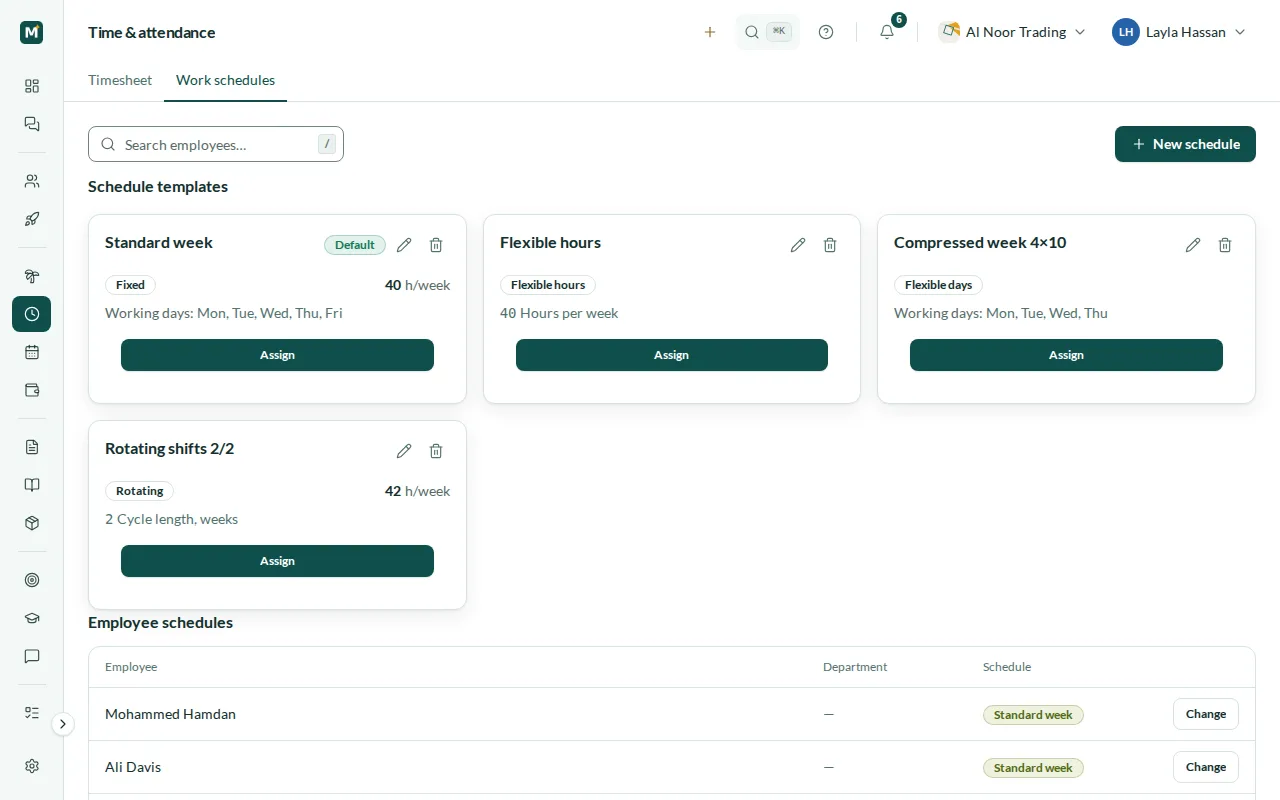
Work schedules: fixed, flexible and rota
Describe how each team works with schedule templates. A fixed schedule sets the working days and weekly hours, flexible hours set only the weekly total, flexible days set how many days a week someone works, and a rota repeats over a cycle of several weeks. Assign a template to an employee from a chosen date: the earlier schedule stays in the history, so past days are still counted by the schedule that applied to them.
- Fixed schedules, flexible hours, flexible days and rotas
- Working days and weekly hours on each template
- Assignment to an employee from an effective date
- Past days counted by the schedule that applied then
Weekly timesheets with bulk approval
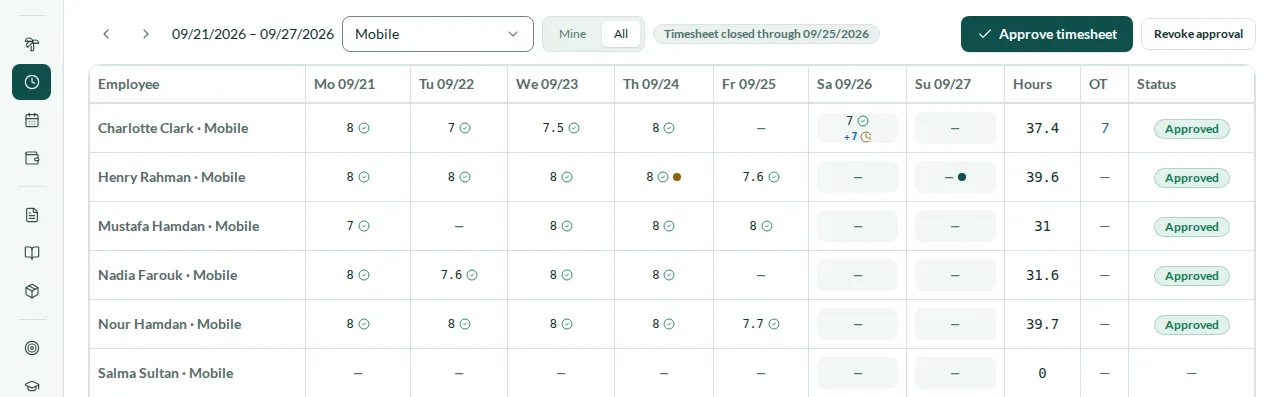
The timesheet is a grid of employees and days for one week, with the hours of each day, the total, overtime and status. Everyone sees their own timesheet; managers switch to the people who report to them; HR sees the whole company, can narrow it down to a department and approves the whole week in one action instead of day by day. If a day changes after approval, it goes back to awaiting approval, so an approved timesheet always matches the punches behind it.
- Three views: my timesheet, my team and everyone
- Hours, overtime and status for every employee and day
- Approve a whole week in one action
- A changed day returns to awaiting approval
Attendance correction requests through approvals
Missed a clock-in or clock-out? The employee opens the day on their timesheet, says what was missed and why, and submits a correction request. It goes through the same approval flow as other requests in Mira HR. Once it is approved, the punch is added and the day is recalculated; while it is waiting, its status is shown on the timesheet cell. You decide how many days back a correction can be requested.
- Request for a missed clock-in or clock-out, with a reason
- Decision through the approval flow
- Approved request adds the punch and recalculates the day
- Request status shown on the timesheet cell
Overtime by the rules of your country
Every day is split into regular hours and four kinds of overtime: hours above the daily norm on a working day, night hours, work on a weekly rest day and work on a public holiday. On a rest day or a holiday the whole shift counts, not only the hours above the norm. The multipliers and the night window come from the rules of the country of each legal entity, so a UAE team and an Egyptian team in the same account are each counted by their own law.
- Regular, night, rest-day and public-holiday overtime
- Multipliers and night window by the country of the legal entity
- Whole shift counted on rest days and public holidays
- Overtime shown per day and in the weekly total
Payroll that waits for approved timesheets
Together with the Payroll module, Time & Attendance closes the loop. A payroll run for a legal entity is not calculated until its timesheets are approved, and Mira HR lists the employees whose timesheets are not yet approved. Overtime is paid from approved timesheets at an hourly rate derived from the monthly basic salary. Once the payroll run is approved, the days it covered are frozen and can no longer be edited.
- Payroll run blocked until timesheets are approved
- List of employees whose timesheets are not yet approved
- Overtime paid from approved timesheets
- Days frozen after the payroll run is approved
Steps
How you get started
Turn on time tracking
Enable Time & Attendance for your company and decide how many days back correction requests are allowed.
Set up schedules
Create fixed, flexible or rota templates and assign them to your people from the date they apply.
Let people clock in
Employees clock in and out from the browser, and their hours appear on the weekly timesheet.
Approve and pay
HR approves the week in bulk; with the Payroll module, overtime is paid from approved timesheets.
Local rules
Overtime and working weeks for the UAE and Egypt
United Arab Emirates
- Overtime at 1.25× on working days and 1.5× at night, on rest days and on public holidays
- Night window from 22:00 to 04:00
- Monday–Friday working week preset
- Overtime paid in AED payroll together with the Payroll module
Egypt
- Overtime on top of the monthly salary at 1.35× on working days, 1.7× at night, 2× on a rest day and 2× on a public holiday
- Fixed night window from 22:00 to 06:00; the law counts night from sunset to sunrise, so check the hours before 22:00 manually
- Sunday–Thursday working week preset
- Overtime paid in EGP payroll together with the Payroll module
Related
Works with
Payroll
Monthly runs per legal entity, WPS-ready SIF files, Article 51 gratuity, Egyptian income tax and social insurance.
Core HR
Employee records, org chart, legal entities, statutory time off, team calendar, assets, chat, tasks and a knowledge base.
Employee self-service
Every employee’s own corner of Mira HR: profile, documents, assets, time off with balances, requests and, with Payroll, payslips and expense claims. On Android in early access.
Approvals & requests
One approval engine for time off, expense claims, punch corrections, leave encashment and your own request types, with chains of up to three levels and deadlines in working days.
FAQ
Time & Attendance questions
What is included in Time & Attendance?
Web clock-in and clock-out, work schedules, weekly timesheets with bulk approval, attendance correction requests and overtime calculated by the rules of your country. It is a module you add to Core HR.
How is overtime calculated?
Each day is split into regular hours and four kinds of overtime: above the daily norm, at night, on a weekly rest day and on a public holiday. The multipliers and the night window follow the country of the employee’s legal entity: in the UAE 1.25× on working days and 1.5× at night, on rest days and on holidays; in Egypt, on top of the monthly salary, 1.35×, 1.7× at night, 2× on a rest day and 2× on a public holiday. Egyptian law also requires a replacement day off for work on a rest day; grant it as leave.
Do we need the Payroll module to pay overtime?
Yes. Time & Attendance counts the hours and the overtime; paying it is done by the Payroll module. With both, overtime is paid from approved timesheets, and a payroll run waits until the timesheets of its legal entity are approved.
What happens if someone forgets to clock out?
They submit a correction request for the missed punch, with a reason. Once it is approved, the punch is added and the day is recalculated. You set how many days back such a request can be made.
Can timesheets be approved at several levels?
Coming soon. Today timesheets are approved in one step by HR. Multi-level approval along your org structure is planned.
Can different teams work on different schedules?
Yes. Create as many templates as you need, fixed, flexible or rota, and assign each employee their own from the date it applies.
How is Time & Attendance priced?
It is a module priced per employee per month, on top of Core HR, and it is not part of the free plan for teams of up to 3 people. The pricing page has the details.
From the blog
 Guides
Shift management for Egypt's shops and restaurants
Retail and hospitality run on nights, weekends, and holidays — the hours Egyptian law prices differently. How to keep the rota and payroll in sync.
 Compliance
Time tracking for hybrid teams in Egypt: beyond biometrics
Hybrid work broke the single-turnstile model, and under the 2025 labor law attendance records are a legal duty. Why biometrics are a liability.
 Compliance
Egypt's new labor law (2025): what changed for employers
Egypt replaced its 2003 labor law in September 2025. What changed for leave, working hours, and holidays — and why it's a setup problem, not a legal one.
Set up HR for your company in 10 minutes
No implementation fees. Cancel anytime.