LMS software for teams in the UAE and Egypt
Build courses from sections of text, files, links, quizzes and assignments. Assign them to people, departments or the whole company with a due date, let employees enroll themselves from the catalog, and see who has completed what in a report you can export.
UAE labour law basics
In progressCompleted
Progress0%67%100%
- Introduction
- Leave and working hours
- Final quizPassed
Before and after
Where company training usually falls apart
Before
Training lives in shared folders and email threads. New joiners get a list of links, and nobody can say who actually read the safety rules.
With Mira HR
Each course is a set of sections and materials in one place, and every material an employee finishes is marked as done.
Before
Knowledge checks are a form sent around after the session. Someone scores them by hand, and practical tasks come back as attachments in a manager’s inbox.
With Mira HR
Quizzes are scored against your pass mark and an optional limit on attempts, and assignments wait in a review queue where a curator accepts them or returns them with a note.
Before
Mandatory training has a deadline in a spreadsheet. HR chases people one by one and cannot tell which department is behind.
With Mira HR
Assign a course to whole departments with a due date. Employees get reminders before it, and the course report shows who has not started, who is in progress and who is overdue.
Features
Courses, knowledge checks and control in one module
A course builder with sections and five material types
A course is made of sections, and sections hold materials of five types: text, file, link, quiz and assignment. Texts are written in a visual editor with headings, lists, tables, links and images. Give the course a 16:9 cover, a description, a category and an estimated duration. Embedded links from an approved list of services can open right inside the course; links to other sites open in a new tab. A new course is a draft that employees do not see. It can be published once it has materials, every file material has its file and every quiz has questions. When a course is no longer needed, archive it: it leaves the catalog, and finished enrollments stay as history.
- Sections with text, file, link, quiz and assignment materials
- Visual editor with tables and images
- Covers, categories and embedded links
- Draft, published and archived courses
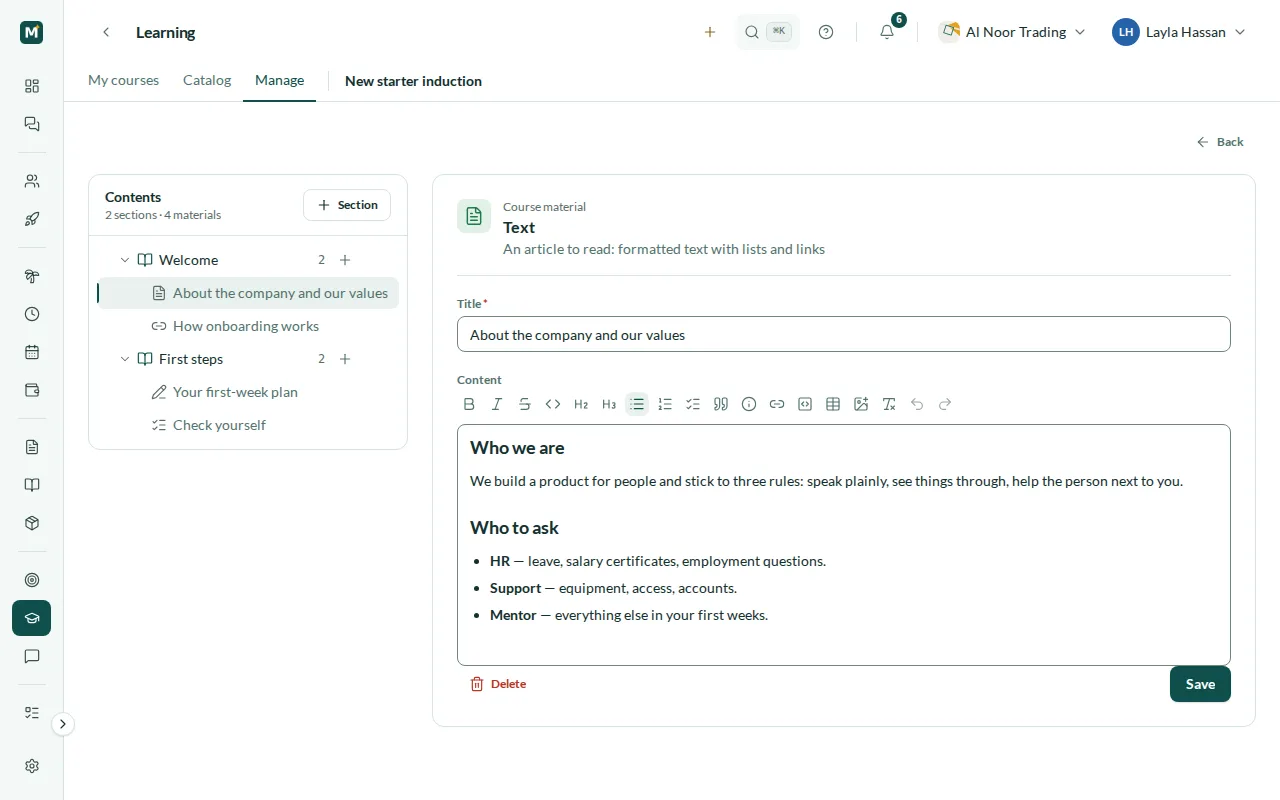
Quizzes with a pass mark and a limit on attempts
A quiz is a material inside the course. Each question has two to ten answer options and either one correct answer or several. Set the passing score as a percentage and, if you want, the number of attempts allowed; leave it empty and attempts are unlimited. After each attempt the employee sees their score, whether they passed and which questions they got right or wrong, but not the correct answers, so the next attempt is not a copy of the key. The quiz counts as done only once it is passed.
- Single and multiple correct answers
- Passing score as a percentage
- Optional limit on attempts
- Score and right or wrong for every question
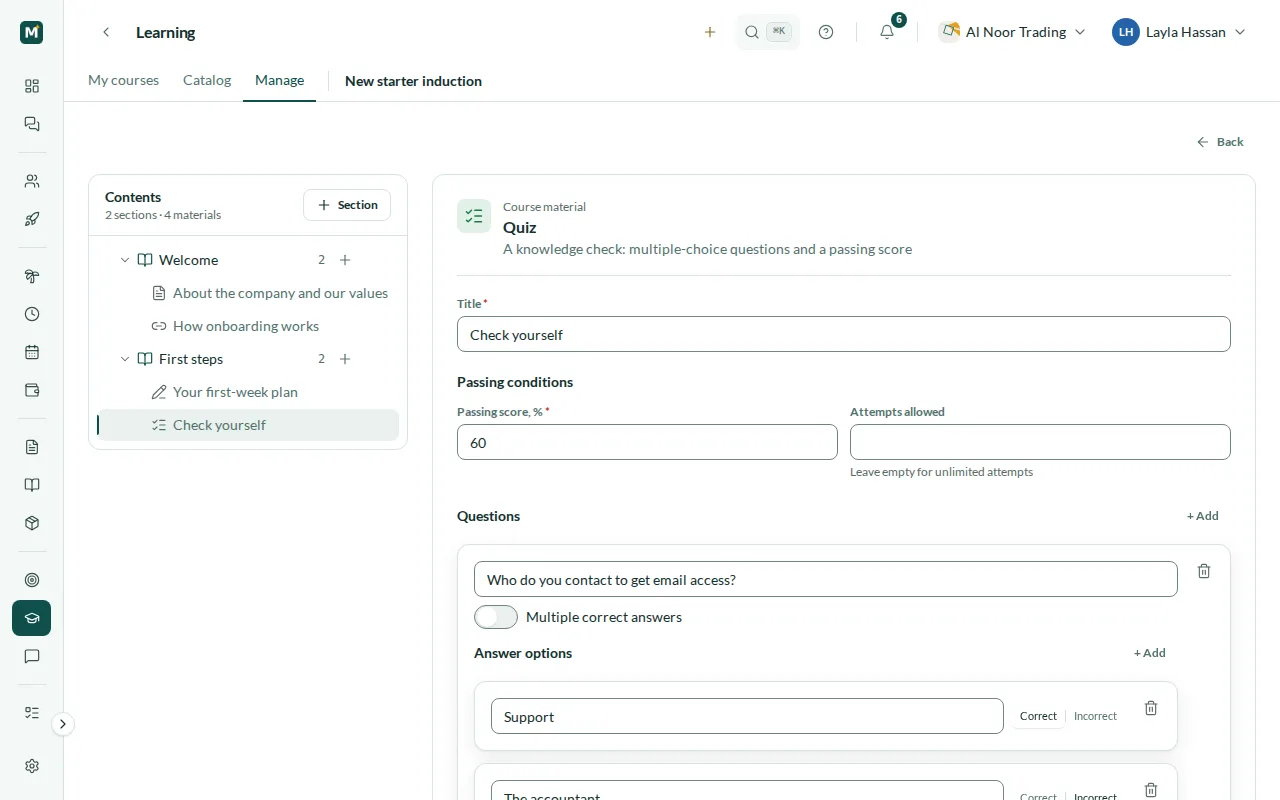
Assignments reviewed by a curator
An assignment asks the employee to do something and report back: a written answer, a file or both, and you can make the file required. Submissions go to a review queue for the course curators, the people with edit access to the course, who also get a notification. A curator reads the answer, opens the attachment and accepts the submission or returns it for rework with a note that says what to fix. The employee is notified of the decision and, if it was returned, can submit again, and every earlier submission stays in the history. Once accepted, the assignment counts as done.
- A written answer, a file or both
- Review queue for the course curators
- Accept, or return with a note
- History of every submission
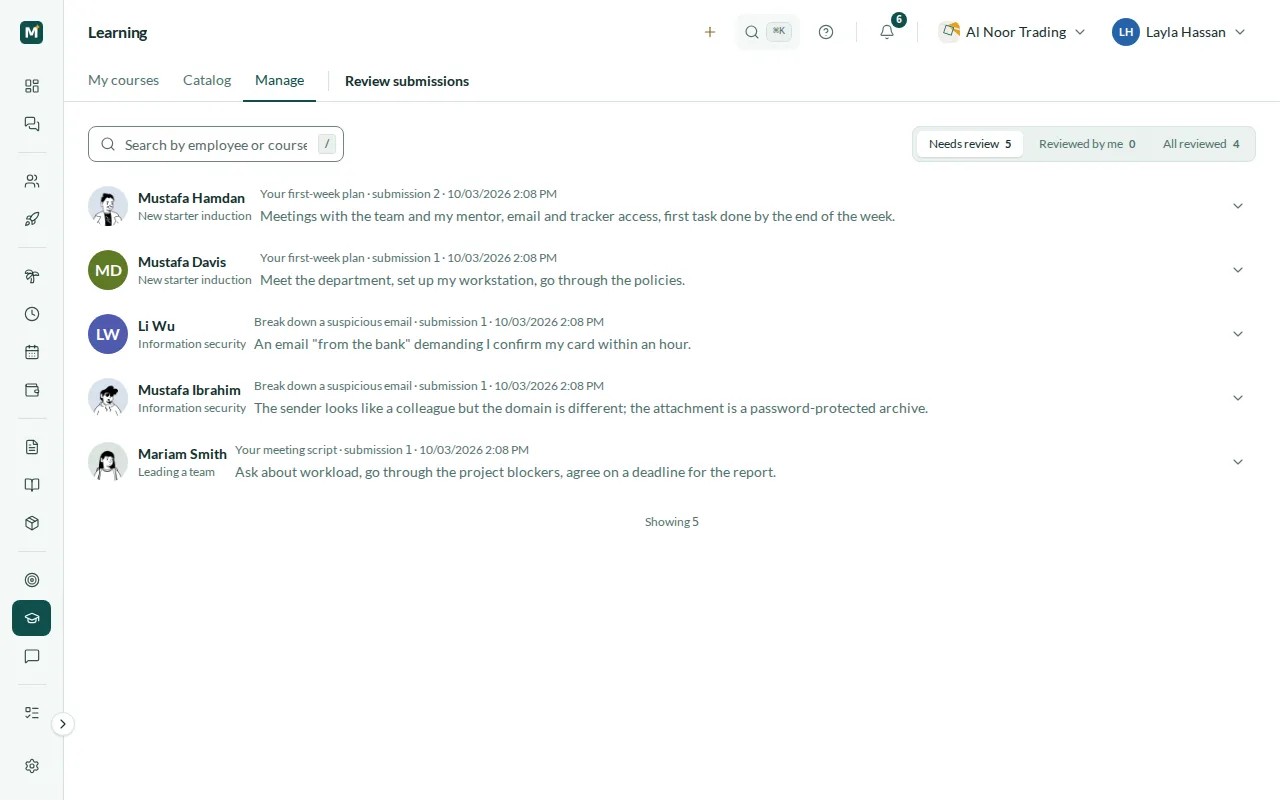
Self-enrollment and assignments with due dates
Open a course for self-enrollment and employees can join it from the company catalog themselves. For training people must take, assign the course: to chosen employees, to departments together with their sub-departments, or to everyone in the company, with or without a due date. Assigning to the whole company covers the people in it today; people who join later are not added automatically. Assigned employees get a notification with a link to the course. Access rights on each course decide who can see it, who can edit it and review its assignments, and who manages access to it.
- Self-enrollment from the company catalog
- Assign people, departments or the whole company
- An optional due date for every assignment
- Access rights on every course
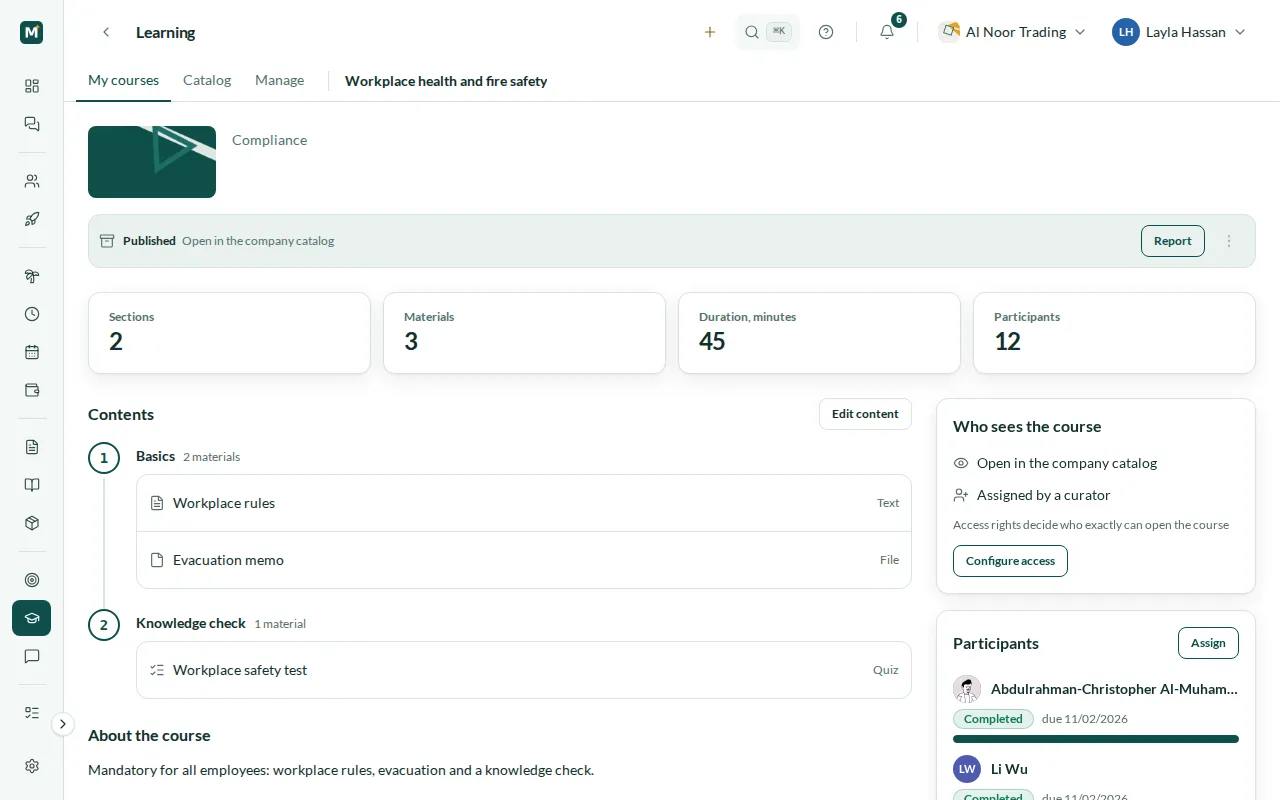
A completion report for every course
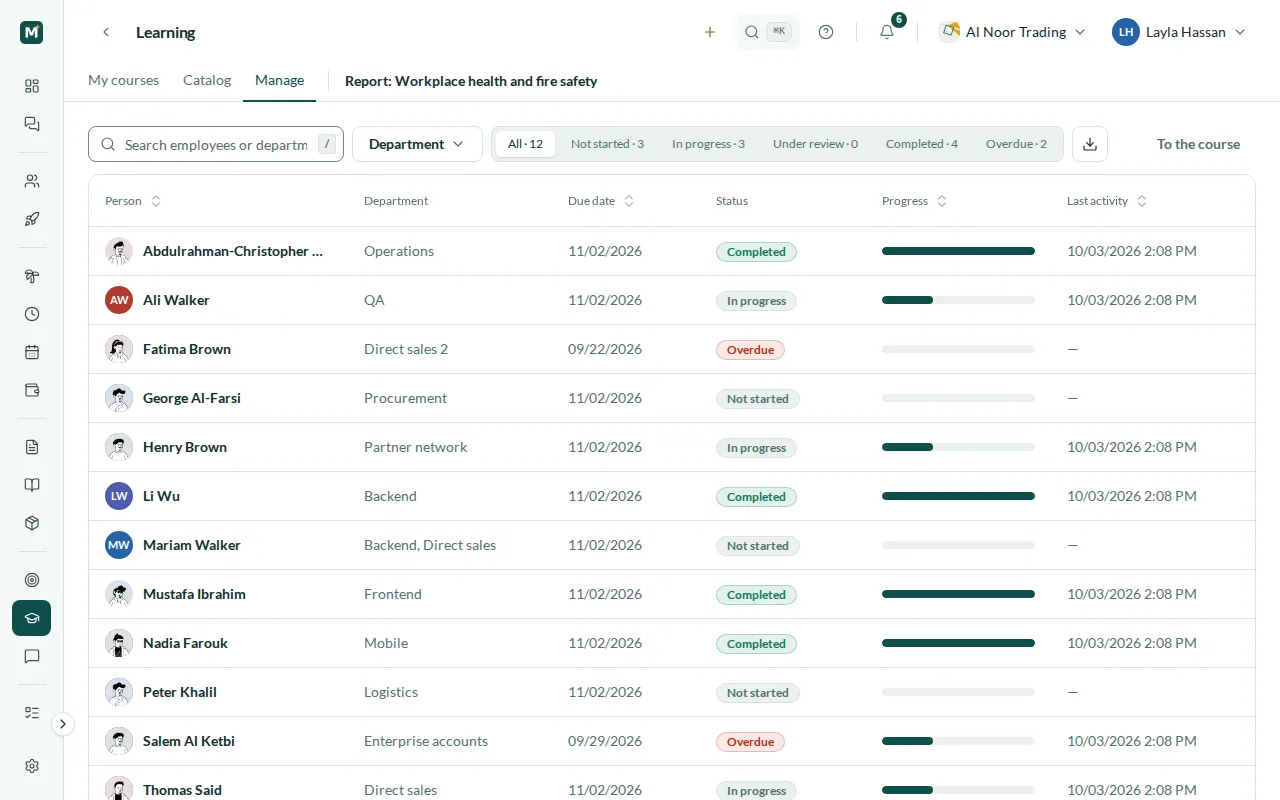
The course report lists everyone enrolled with their departments, due date, status, progress as a percentage, start and completion dates and last activity. Switch between not started, in progress, under review, completed and overdue, search by name or department and filter by department. Export what you see to Excel or CSV for an audit or a management meeting. The Manage view shows every course you curate with how many people have completed it and how many submissions are waiting for review.
- Status, progress and dates for each person
- Slices from not started to overdue
- Search and a department filter
- Export to Excel or CSV
Reminders before and after the due date
When a course is assigned with a due date, Mira HR keeps track of it. By default the employee is reminded seven, three and one day before the due date while the course is not completed, and again once the due date has passed. Reminders arrive by email as well as in the app, because the people who rarely open an HR system are often the ones who need them most. Once the course is completed, the reminders stop.
- Reminders 7, 3 and 1 day before the due date
- A reminder when the course is overdue
- Email and in-app notifications
- Nothing more once the course is completed
Steps
How you get started
Build the course
Add sections and materials, write the texts in the editor, attach files and set up quizzes and assignments.
Publish it
Publish the course once it is ready and decide who can see it. Turn on self-enrollment if anyone may join.
Assign it
Assign the course to people, departments or the whole company, with a due date for mandatory training.
Review and track
Review submitted assignments, follow progress in the course report and export it when you need it.
Related
Works with
Performance management
Goals and OKRs, review cycles with self-assessment, 360° feedback, 9-box calibration, KPI bonuses, development plans and engagement surveys.
Core HR
Employee records, org chart, legal entities, statutory time off, team calendar, assets, chat, tasks and a knowledge base.
Onboarding & offboarding
Programs with stages and deadlines, a board of every new hire, UAE and Egypt government checklists, and exits with asset checks and, with Payroll, a settlement check.
HR analytics & reports
Headcount, annualised turnover and hiring trends, ready-made HR reports with CSV and Excel export, and NOSI Form 1 and Form 6 pre-filled for Egypt.
FAQ
Learning questions
What is included in Learning?
A course builder with five material types, quizzes, assignments with curator review, self-enrollment and assignment with due dates, a completion report with export and due-date reminders. It is a module you add to Core HR.
When is a course completed?
When every material in it is done. The employee marks texts, files and links as done, a quiz counts once it is passed and an assignment once a curator accepts it. The course is completed as soon as its last material is done.
Who reviews assignments?
The curators of the course: the people with edit access to it. They see submissions in a review queue and accept them or return them with a note, and the employee can then submit again.
Can employees choose courses themselves?
Yes, where self-enrollment is on. Published courses an employee has access to are listed in the company catalog, and they can enroll in those open for self-enrollment. Other courses are assigned by a curator.
Does Learning work in Arabic?
Yes. Mira HR works in Arabic and English, right to left in Arabic, and each person chooses their own language. Course content is written by you, in the language your team uses.
How is Learning priced?
It is a module priced per employee per month, on top of Core HR, and it is not part of the free plan for teams of up to 3 people. The pricing page has the details.
From the blog
 Insights
Keeping talent in Cairo: it's not about a better desk
You can't out-pay a dollar remote job in Egypt. What keeps skilled people is a visible path, benefits that land, and being heard. Here's how to run it.
 Guides
Is Egypt ready for paperless HR? Yes, with two catches
Egypt's 2025 labor law allows digital employee files, payroll, and contracts. What still needs paper, and why a Drive folder isn't going paperless.
 Insights
KPIs and 360 feedback in Egypt: start with the culture
In a high-power-distance culture, a copy-pasted 360 gets polite silence. How to run reviews, OKRs, and upward feedback in Egypt without breaking trust.
Set up HR for your company in 10 minutes
No implementation fees. Cancel anytime.